Lunar Festival & Test Server Changes
General Changes
- Fixed an issue with Demonic items not applying effects on the Triumphus server.
- Fixed an issue with the Coliseum Event that caused players who exceeded the registration thresholds to be unable to register afterwards.
Test Server Changes
These changes will not be going live right now, and will only be available on the Test Server until they are finished being tested and issues resolved.
- General Changes
- Fixed an issue with warehouses that caused characters to be unable to interact with NPC's and other players.
- Equipment Presets
- Players can now test the new equipment preset system on the test server.
- You can equip a secondary gear set and quickly swap between your primary and secondary presets.
- Swapping presets has a 3-second cooldown.
- Presets can be switched even while transformed, as long as both presets were set up before transforming.
- If your secondary preset has an empty slot, the game will automatically use the item from your primary preset for that slot.
- Example: If your primary preset has a Triumphus Sword and your secondary preset has no weapon, the Triumphus Sword will still be used.
- When viewing your secondary preset in the equipment interface, any items inherited from the primary preset appear as semi-transparent.
- How to switch presets
- Click the new "1" or "2" buttons at the bottom-left of the equipment window.
- Press the preset hotkey (Ctrl+X).
- Configurable Hotkeys
- Some hotkeys can now be changed by manually editing the user.ini file in your games Bin directory.
- This can be done by editing the "Key" value in the "HotkeyConfig" section.
- For example, the equipment preset key can be switched to "Ctrl+Z" by changing the value IK_X to IK_Z in the following line:
- Default Line: EquipmentPresetKey=(KeyName="EquipmentPresetKey",bAltPressed=False,bCtrlPressed=True,bShiftPressed=False,Key=IK_X)
- Changed Line: EquipmentPresetKey=(KeyName="EquipmentPresetKey",bAltPressed=False,bCtrlPressed=True,bShiftPressed=False,Key=IK_Z)
- Key Combinations can also be configured by combining Ctrl, Alt, and/or Shift with other general keys.
- An ingame hotkey settings interface will be added in a future update. For now, manual editing is available.
- Currently configurable hotkeys (more will be added with the interface)
- Equipment preset switch
- Weapon sheath
- Item pickup
- Some hotkeys can now be changed by manually editing the user.ini file in your games Bin directory.
- Important Test Server Notes
- The equipment changes required major changes to how items are stored, so the test server has been updated with a copy of the live Mystic server.
- Please verify that your items on the test server match the live server (location, stats, levels, etc.).
- Compare against your items before the restart, since any changes made after the restart will not appear on the test server copy.
- Additionally, we encourage players to test other item related functionality as these changes did touch on several different systems. This includes, but is not limited to:
- PvP
- PvE/Monster Drops
- Trading
- Opening Items (such as pouches).
- Using Items
- Booths
- Warehouses
- etc
- The equipment changes required major changes to how items are stored, so the test server has been updated with a copy of the live Mystic server.
Lunar Event
The Lunar New Year is here, and Turf Battles is ready to celebrate! From now until March 3rd, players can take advantage of the following events, rewards, and offers.
- Lunar Festival Quest
- Tormac (in Ladianes) has heard that Nian has been terrorizing heroes inside various dungeon instances.
- Speak to Tormac to start the Lunar Festival Quest. This quest can be repeated once every 6 hours and requires players to complete instances before the bonus time expires.
- If you complete the instance before the bonus time expires, there is a 90% chance that Nian will appear in your dungeon. Nian rewards players with the same experience and drops as other dungeon monsters, but can also drop Red Packets. Note that Nian appears at the last boss of each dungeon.
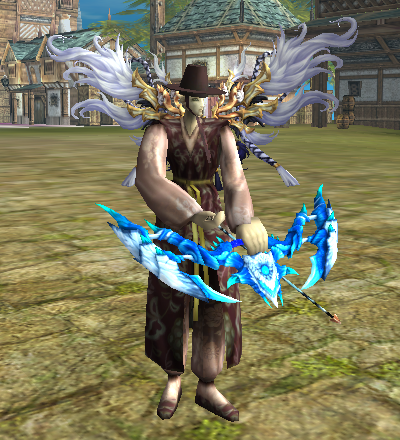
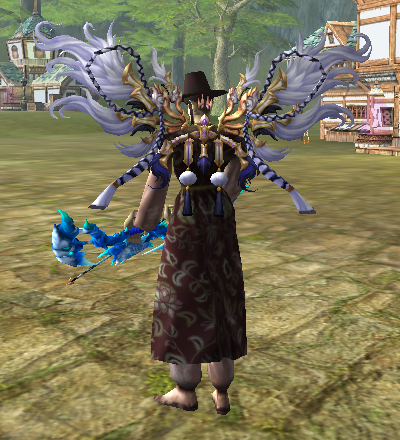
- Red Lunar Outfit & Pegasus Wings
- Players can unlock the Red Lunar Outfit by collecting 50 Red Packets or by purchasing it from the Cosmetic Loadout Interface for 250 TC.
- Players can purchase the new Pegasus Wings, but only during this years Lunar Festival event.
 |
 |
- Pets
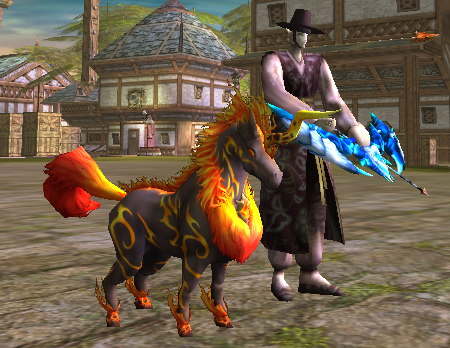
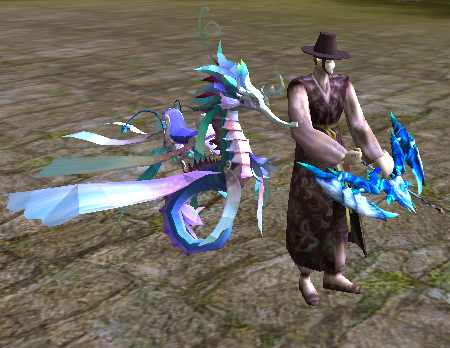
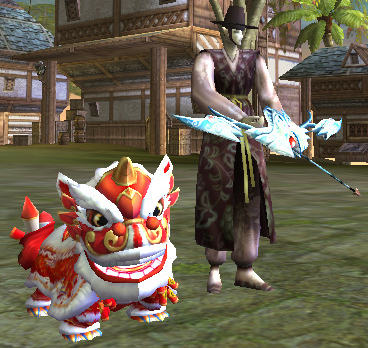
- To celebrate the year of the horse, we've added two new pets to the pet interface (these pets are available for purchase only during this Lunar Festival event).
- Baby Nian is now able to be purchased again (this pet is available for purchase only during any Lunar Festival event).
| Fircorn | Seahorse | Baby Nian |
 |
 |
 |
- Event Box
- An Event Box has been added in the middle of Ladianes.
- It can be used once a day to gain either a Event Chocolate or a Lunar Festival Pouch, which can be opened to get a random number of Red Packets (1-4).
- Event Merchant
- In addition to unlocking the Red Lunar Outfit, Red Packets can be traded for Event Coupons at the Event Merchant NPC (next to Yuba in Ladianes).
- Event Coupons can then be used to purchase an Event Chest or Event Chocolate (chocolates will be removed at the end of the event).
- 5 Red Packets will get you 1 Event Coupon, and you can purchase Event Chocolates for 1 Event Coupon or 1 Event Chest for 2 Event Coupons.
- Buffs
- For the duration of the Lunar Festival, players can gain the bonus of the following Fubb Events:
- Pet Experience Buff
- Drop Rate Buff
- Resource Rate Buff
- For the duration of the Lunar Festival, players can gain the bonus of the following Fubb Events:
- Other Events
- During the Lunar Event the Pet Boss Spawn Event will happen once every 2-3 days.
- Players can buy fireworks from the Firework Merchant (near Pet Hotel in Ladianes) until the Lunar Festival ends.